• We’ll look at a simple program using while loop, and explain in detail the working of the program. (Related to course – Programming in C (CS 3251) of Anna University.)
    Print Hello on the Screen (One Time)

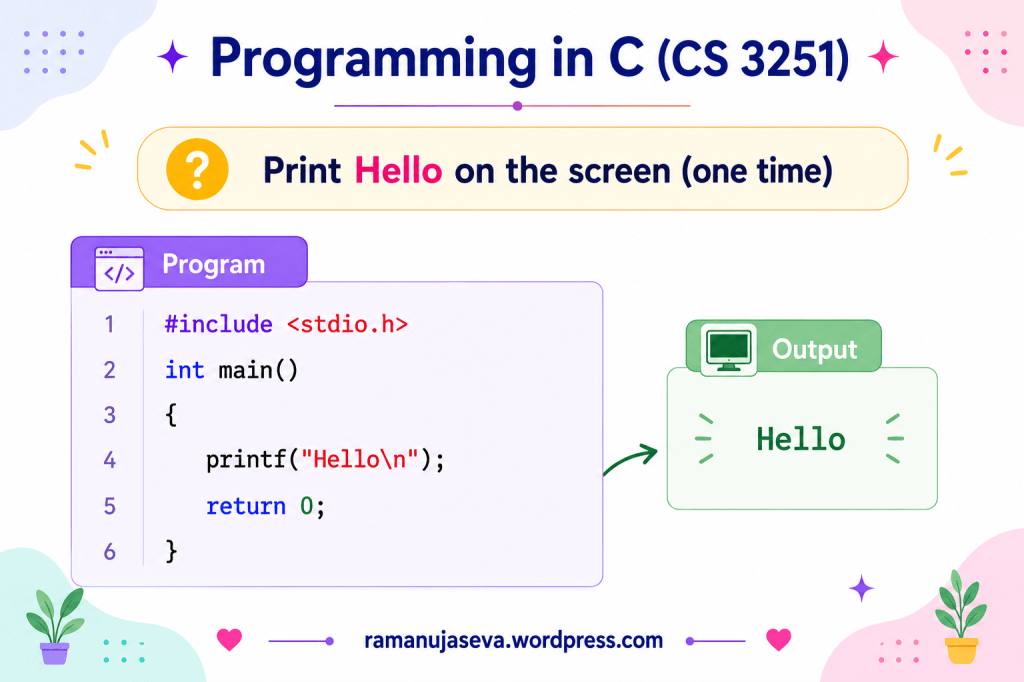
    Let us first write a simple program to print Hello on the screen one time.

    #include <stdio.h>
    int main()
    {
    printf("Hello\n");
    return 0;
    }
    Output
    Hello

    Print Hello on the Screen 5 Times

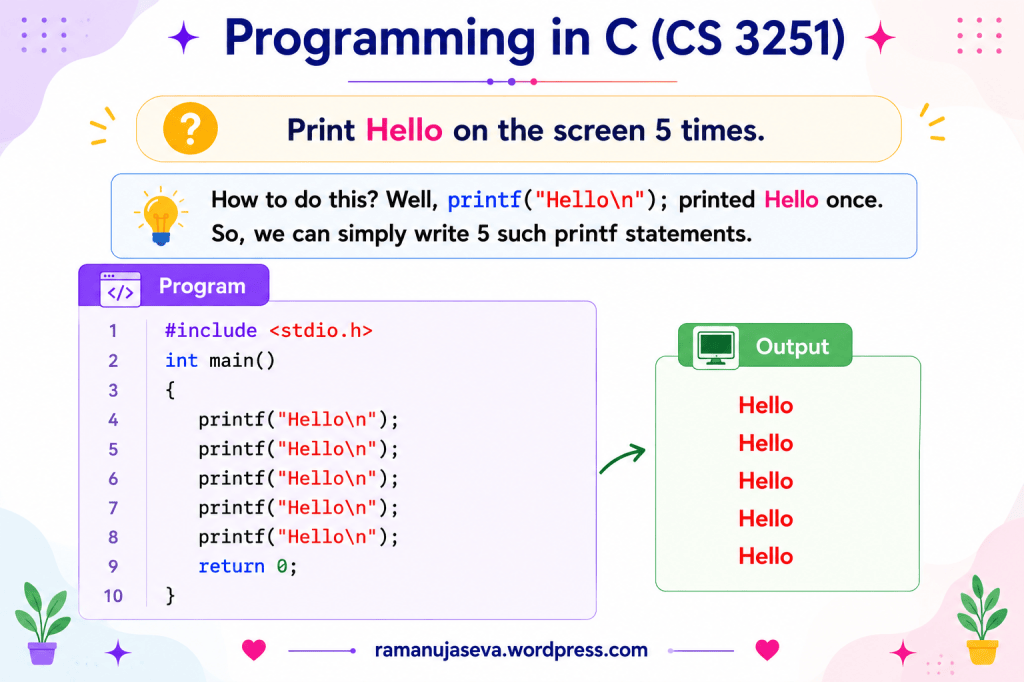
    How to do this?

    Well, printf("Hello\n"); printed Hello once.

    So, we can simply write 5 such printf statements.

    #include <stdio.h>
    int main()
    {
    printf("Hello\n");
    printf("Hello\n");
    printf("Hello\n");
    printf("Hello\n");
    printf("Hello\n");
    return 0;
    }

    Output

    Hello
    Hello
    Hello
    Hello
    Hello

    Introducing Loops

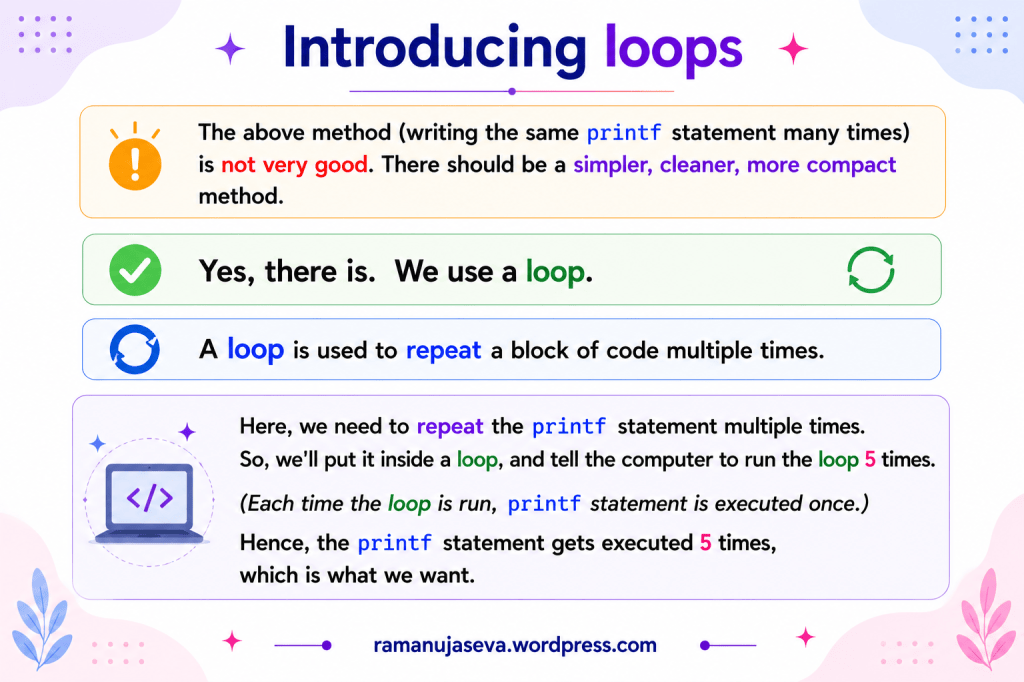
    The above method (writing the same printf statement many times) is not very good. There should be a simpler, cleaner, more compact method.

    Yes, there is. We use a loop.

    A loop is used to repeat a block of code multiple times.

    Here, we need to repeat the printf statement multiple times. So, we’ll put it inside a loop, and tell the computer to run the loop 5 times.

    (Each time the loop is run, printf statement is executed once.)

    Hence, the printf statement gets executed 5 times, which is what we want.


    Program Using while Loop
    #include <stdio.h>
    int main()
    {
    int i = 1; // Initialisation
    while (i <= 5) // Checking condition
    {
    printf("Hello\n");
    i++; // Increment
    }
    printf("Out of the loop\n");
    return 0;
    }

    Output

    Hello
    Hello
    Hello
    Hello
    Hello
    Out of the loop

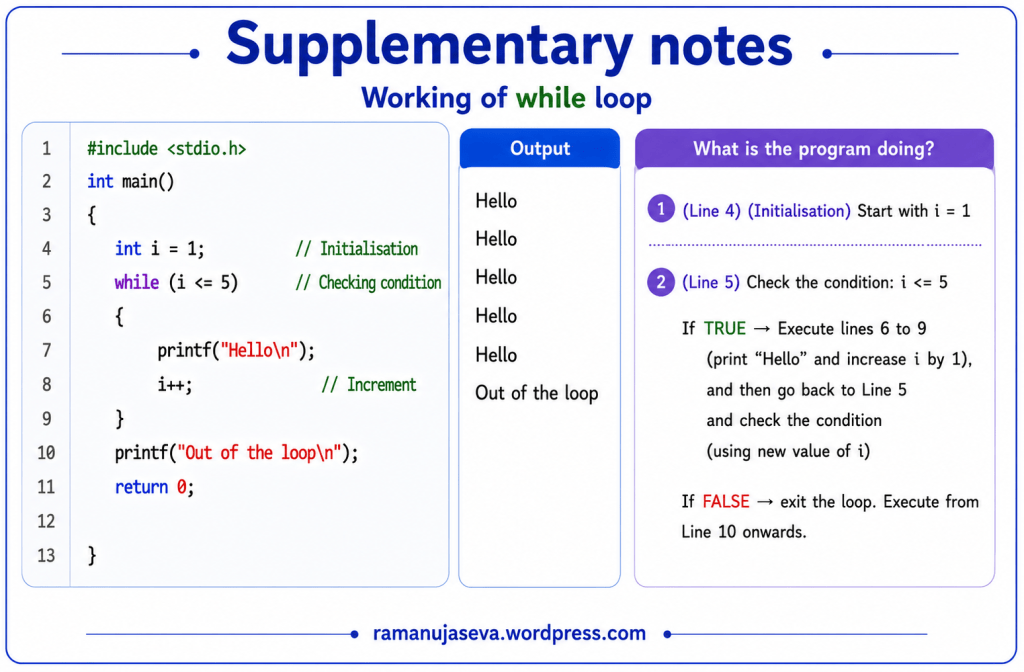
    What is the Program Doing?
    1. (Line 4) (Initialisation)

    Start with i = 1.

    2. (Line 5)

    Check the condition: i <= 5

    If TRUE → Execute lines 6 to 9 (print “Hello” and increase i by 1), and then go back to Line 5 and check the condition (using new value of i).

    If FALSE → Exit the loop. Execute from Line 10 onwards.


    Working of while Loop (Step by Step)
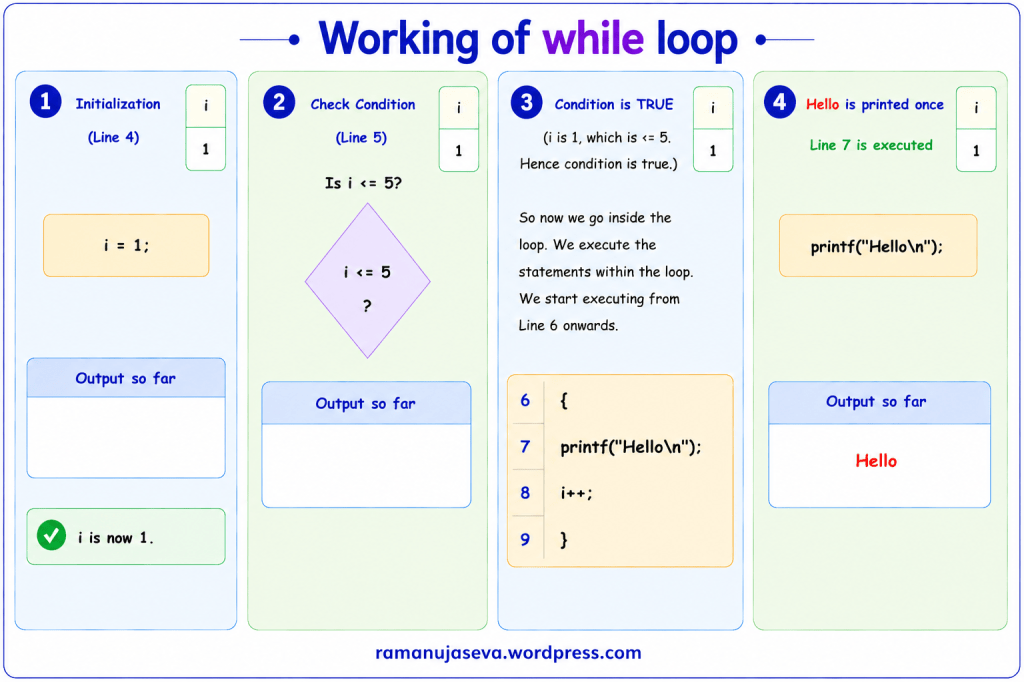
    Panel 1 – Initialization

    (Line 4)

    i = 1;

    i is now 1

    Output so far:

    (No output)

    Panel 2 – Check Condition

    (Line 5)

    Check whether:

    i <= 5

    Current value of i is 1.

    Output so far:

    (No output)

    Panel 3 – Condition is TRUE

    i is 1, which is <= 5.

    Hence condition is true.

    So now we go inside the loop.

    We execute the statements within the loop.

    We start executing from Line 6 onwards.

    {
    printf("Hello\n");
    i++;
    }

    Panel 4 – Hello is Printed Once

    Line 7 is executed.

    printf("Hello\n");

    Output so far:

    Hello

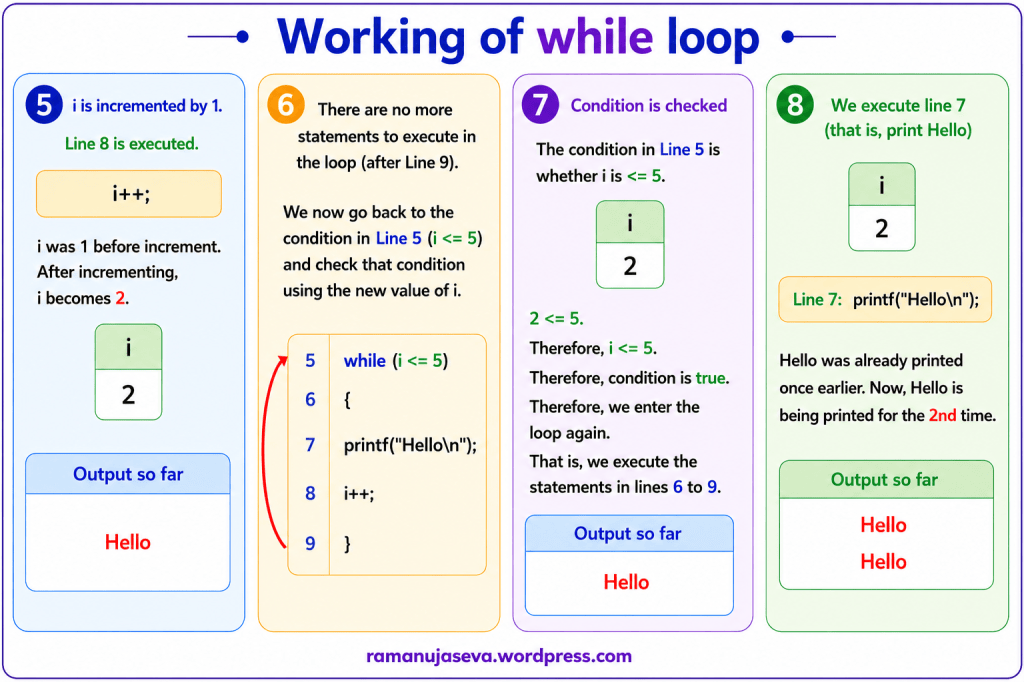
    Panel 5 – i is Incremented by 1

    Line 8 is executed.

    i++;

    i was 1 before increment.

    After incrementing, i becomes 2.

    Output so far:

    Hello

    Panel 6 – reached end of loop

    There are no more statements to execute in the loop (after Line 9).

    We now go back to the condition in Line 5 (i <= 5) and check that condition using the new value of i.

    while (i <= 5)
    {
    printf("Hello\n");
    i++;
    }

    Output so far:

    Hello

    Panel 7 – Condition is Checked

    The condition in Line 5 is whether i is <= 5.

    i is 2.

    2 <= 5.

    Therefore, i <= 5.

    Therefore, condition is true.

    Therefore, we enter the loop again.

    That is, we execute the statements in lines 6 to 9.

    Output so far:

    Hello

    Panel 8 – We Execute Line 7 (that is, print Hello)

    Line 7:

    printf("Hello\n");

    Hello was already printed once earlier.

    Now, Hello is being printed for the 2nd time.

    Output so far:

    Hello
    Hello

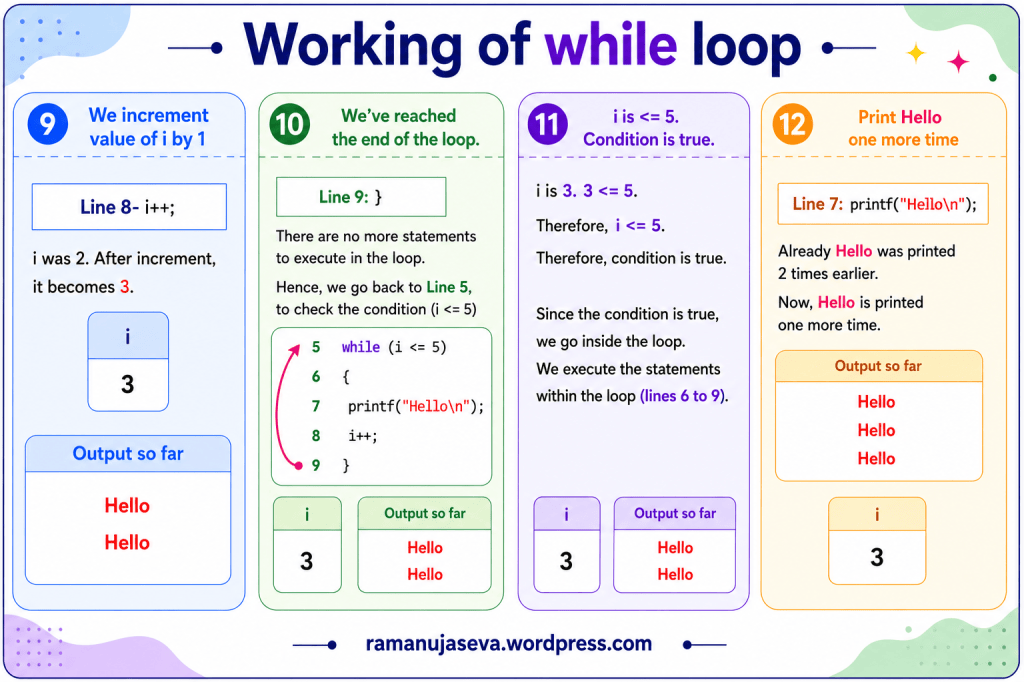
    Panel 9 – We Increment Value of i by 1

    Line 8:

    i++;

    i was 2.

    After increment, it becomes 3.

    Output so far:

    Hello
    Hello

    Panel 10 – We’ve Reached the end of the loop

    Line 9:

    }

    There are no more statements to execute in the loop.

    Hence, we go back to Line 5, to check the condition (i <= 5).

    Current value of i:

    3

    Output so far:

    Hello
    Hello

    Panel 11: i is <= 5. Condition is True.

    i is 3.

    3 <= 5.

    Therefore, i <= 5.

    Therefore, condition is true.

    Since the condition is true, we go inside the loop.

    We execute the statements within the loop (lines 6 to 9).

    Output so far:

    Hello
    Hello

    Panel 12 – Print Hello One More Time

    Line 7:

    printf("Hello\n");

    Already Hello was printed 2 times earlier.

    Now, Hello is printed one more time.

    Output so far:

    Hello
    Hello
    Hello

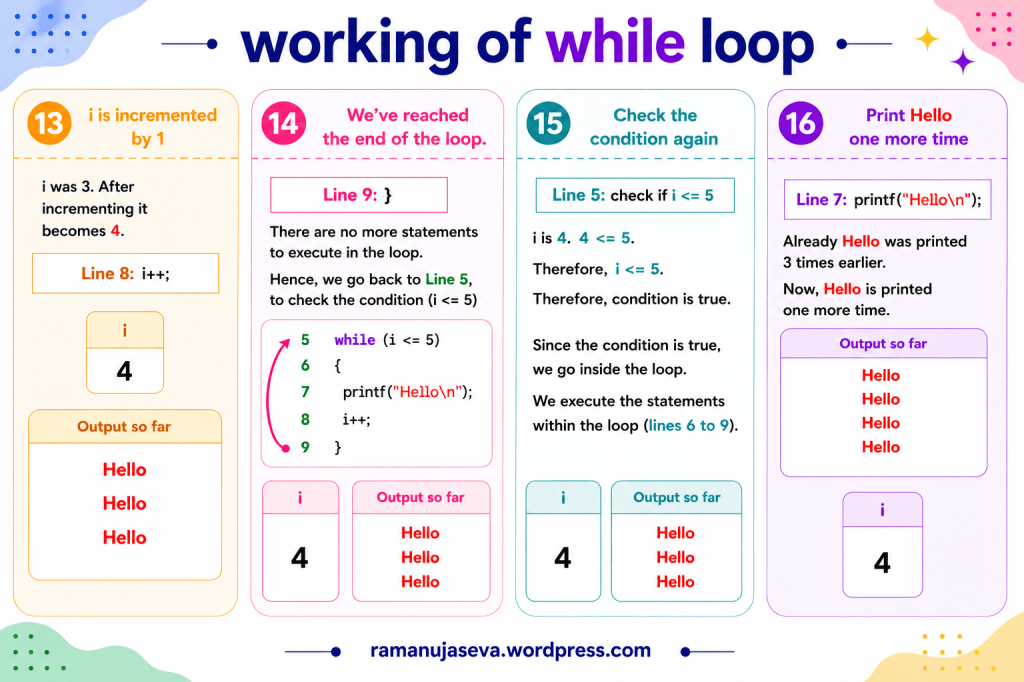
    Panel 13 – i is incremented by 1

    i was 3.

    After incrementing it becomes 4.

    Line 8:

    i++;

    Output so far:

    Hello
    Hello
    Hello

    Panel 14 – We’ve Reached the End of the Loop

    Line 9:

    }

    There are no more statements to execute in the loop.

    Hence, we go back to Line 5, to check the condition (i <= 5).

    Current value of i:

    4

    Output so far:

    Hello
    Hello
    Hello

    Panel 15 – Check the Condition Again

    Line 5:

    Check if i <= 5.

    i is 4.

    4 <= 5.

    Therefore, i <= 5.

    Therefore, condition is true.

    Since the condition is true, we go inside the loop.

    We execute the statements within the loop (lines 6 to 9).

    Output so far:

    Hello
    Hello
    Hello

    Panel 16 – Print Hello One More Time

    Line 7:

    printf("Hello\n");

    Already Hello was printed 3 times earlier.

    Now, Hello is printed one more time.

    Output so far:

    Hello
    Hello
    Hello
    Hello

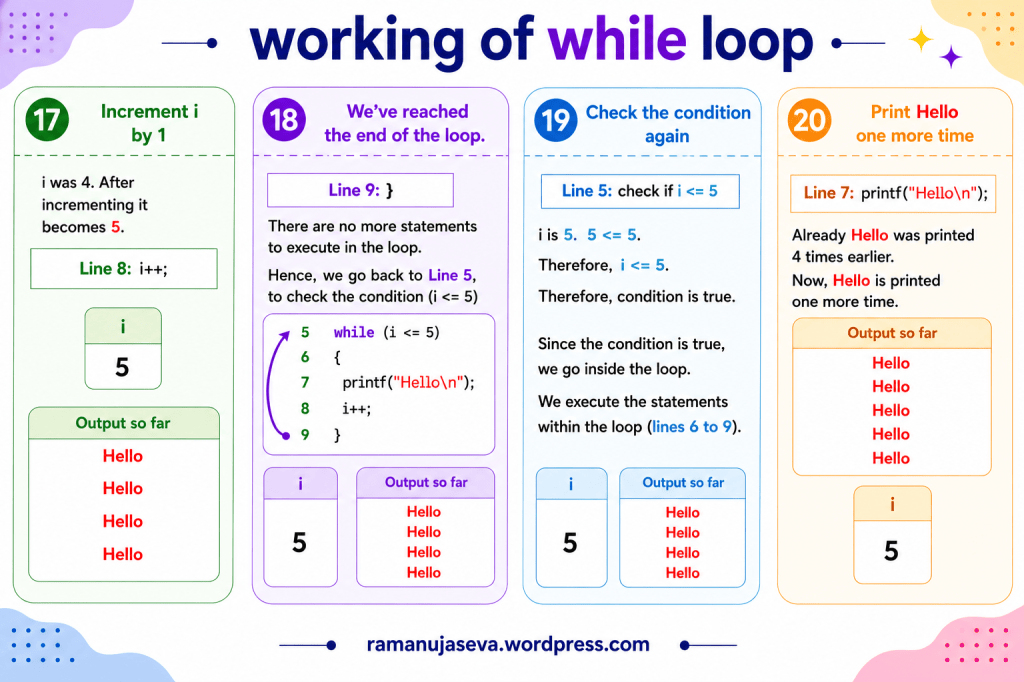
    Panel 17 – Increment i by 1

    i was 4.

    After incrementing it becomes 5.

    Line 8:

    i++;

    Output so far:

    Hello
    Hello
    Hello
    Hello

    Panel 18 – We’ve Reached the End of the Loop

    Line 9:

    }

    There are no more statements to execute in the loop.

    Hence, we go back to Line 5, to check the condition (i <= 5).

    Current value of i:

    5

    Output so far:

    Hello
    Hello
    Hello
    Hello

    Panel 19 – Check the Condition Again

    Line 5:

    Check if i <= 5.

    i is 5.

    5 <= 5.

    Therefore, i <= 5.

    Therefore, condition is true.

    Since the condition is true, we go inside the loop.

    We execute the statements within the loop (lines 6 to 9).

    Output so far:

    Hello
    Hello
    Hello
    Hello

    Panel 20 – Print Hello One More Time

    Line 7:

    printf("Hello\n");

    Already Hello was printed 4 times earlier.

    Now, Hello is printed one more time.

    Output so far:

    Hello
    Hello
    Hello
    Hello
    Hello

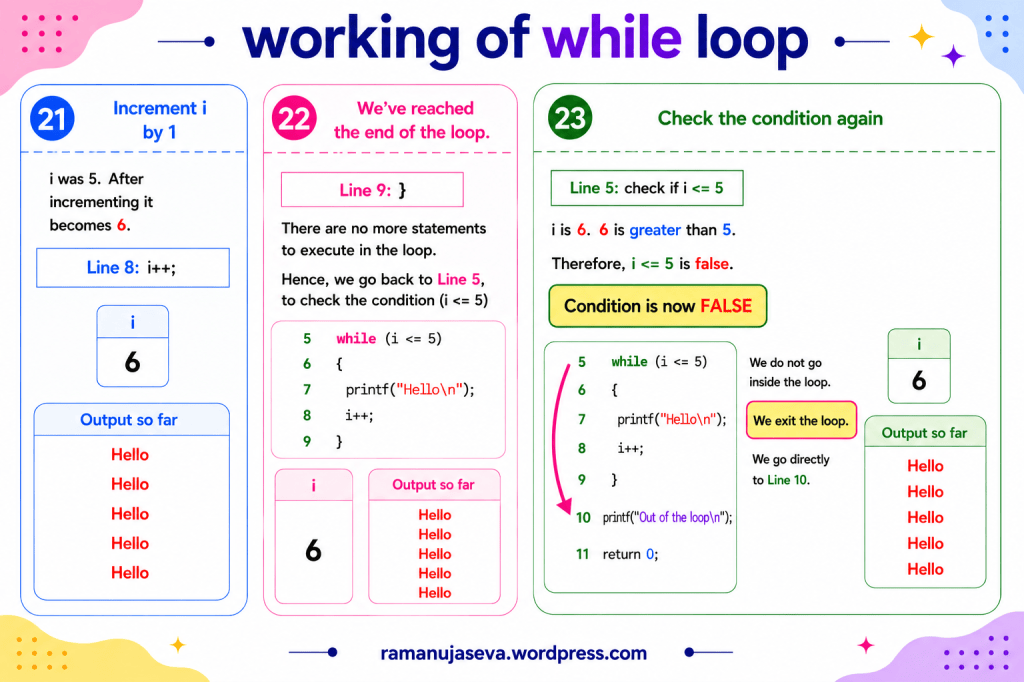
    Panel 21 – Increment i by 1

    i was 5.

    After incrementing it becomes 6.

    Line 8:

    i++;

    Output so far:

    Hello
    Hello
    Hello
    Hello
    Hello

    Panel 22 – We’ve Reached the End of the Loop

    Line 9:

    }

    There are no more statements to execute in the loop.

    Hence, we go back to Line 5, to check the condition (i <= 5).

    Current value of i:

    6

    Output so far:

    Hello
    Hello
    Hello
    Hello
    Hello

    Panel 23 – Check the Condition Again

    Line 5:

    Check if i <= 5.

    i is 6.

    6 is greater than 5.

    Therefore, i <= 5 is false.

    Condition is now FALSE.

    We do not go inside the loop.

    We exit the loop.

    We go directly to Line 10.

    Current value of i:

    6

    Output so far:

    Hello
    Hello
    Hello
    Hello
    Hello

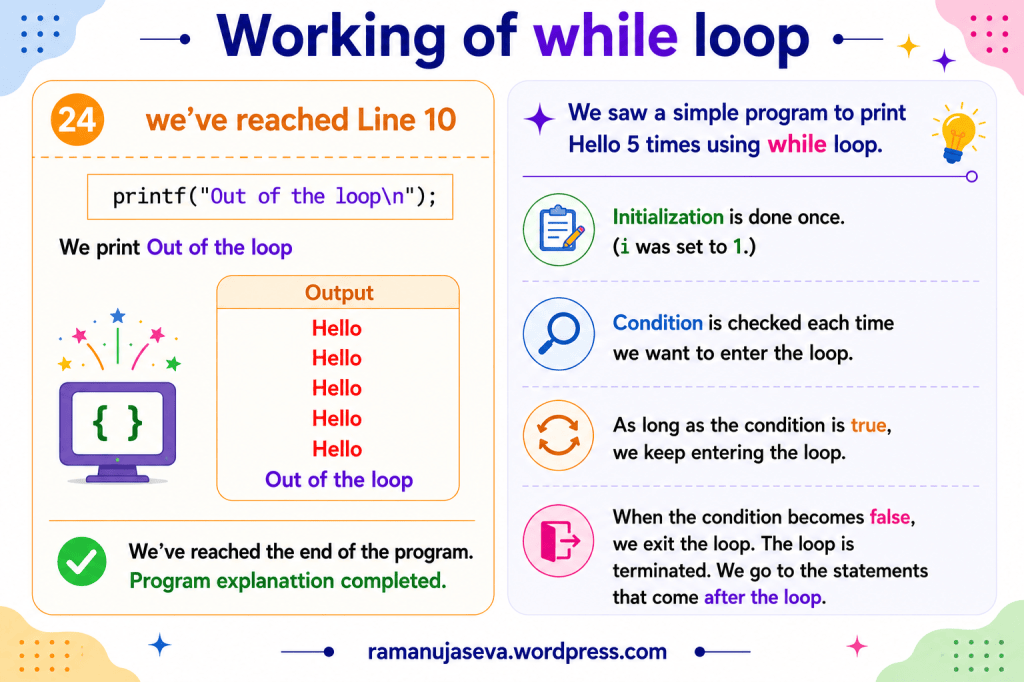
    Panel 24 – We’ve Reached Line 10
    printf("Out of the loop\n");

    We print Out of the loop.

    Output

    Hello
    Hello
    Hello
    Hello
    Hello
    Out of the loop

    We’ve reached the end of the program.

    Program explanation completed.


    Summary

    We saw a simple program to print Hello 5 times using while loop.

    Initialization is done once. (i was set to 1.)

    Condition is checked each time we want to enter the loop.

    As long as the condition is true, we keep entering the loop.

    When the condition becomes false, we exit the loop. The loop is terminated. We go to the statements that come after the loop.
  • Past year exam questions and answers. Programming in C (CS 3251). Unit 1. Assignment operator and equality operator.
    (See Part 4 here: 16 marks Q-A on struct (Unit 4). )

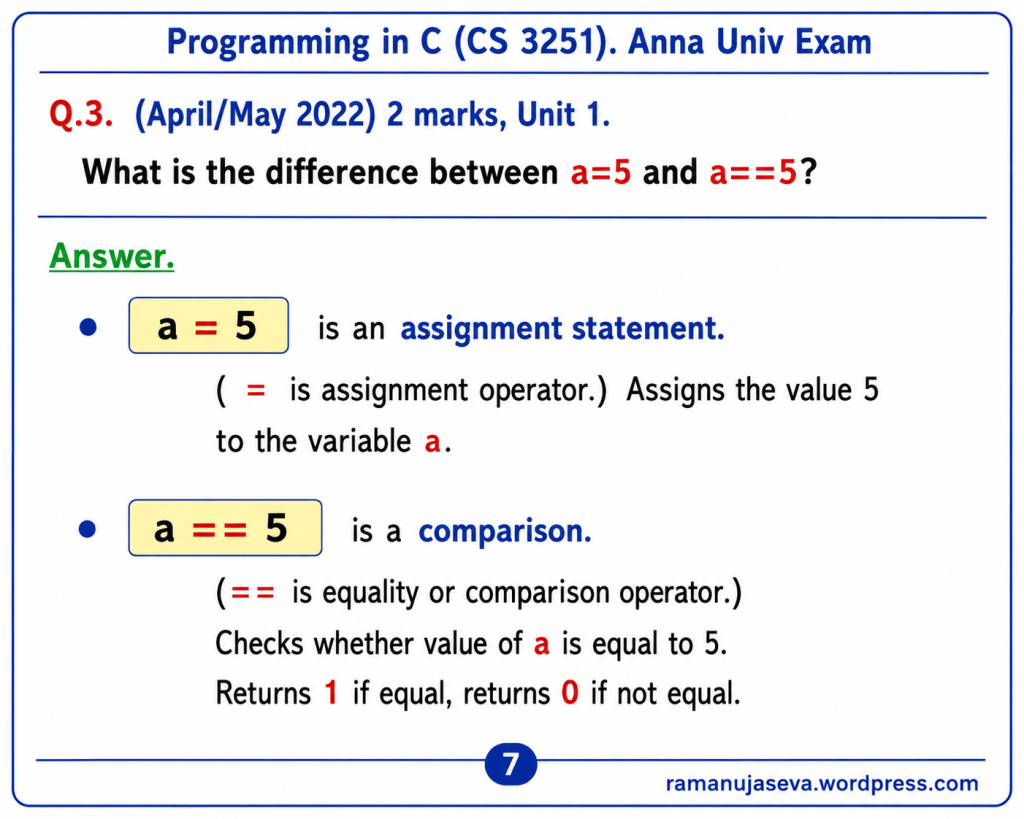
    Q.3. (April/May 2022) 2 marks, Unit 1.
    What is the difference between a=5 and a==5?

    Answer.

    • a = 5 is an assignment statement.
      • (= is assignment operator.)
      • Assigns the value 5 to the variable a.
    • a == 5 is a comparison.
      • (== is equality or comparison operator.)
      • Checks whether value of a is equal to 5.
      • Returns 1 if equal, returns 0 if not equal.

    Supplementary Notes
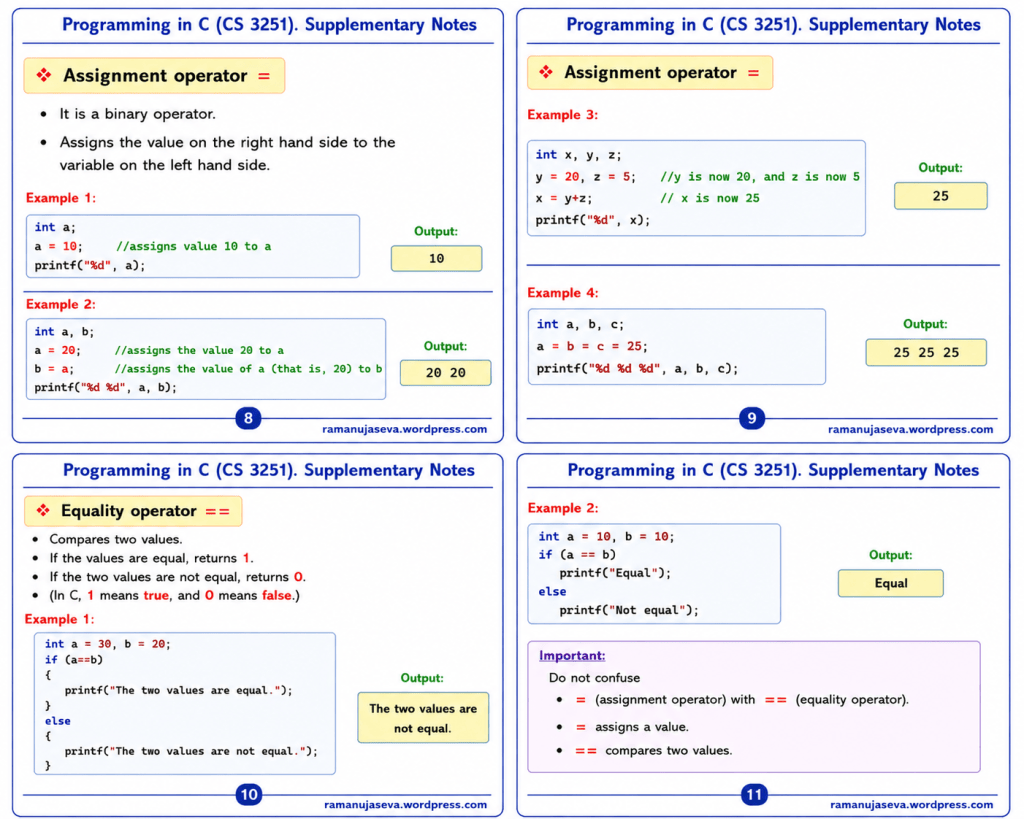
    Assignment Operator (=)
    • It is a binary operator.
    • Assigns the value on the right hand side to the variable on the left hand side.
    Example 1:
    int a;
    a = 10; //assigns value 10 to a
    printf("%d", a);

    Output:
    10

    Example 2:

    int a, b;
    a = 20; //assigns the value 20 to a
    b = a; //assigns the value of a (that is, 20) to b
    printf(“%d %d”, a, b);
    Output:
    20 20

    Example 3:
    int x, y, z;
    y = 20, z = 5; //y is now 20, and z is now 5
    x = y + z; // x is now 25
    printf("%d", x);

    Output:

    25
    Example 4:
    int a, b, c;
    a = b = c = 25;
    printf("%d %d %d", a, b, c);

    Output:

    25 25 25

    Equality Operator (==)
    • Compares two values.
    • If the values are equal, returns 1.
    • If the two values are not equal, returns 0.
    • In C, 1 means true, and 0 means false.
    Example 1:
    int a = 30, b = 20;
    if (a == b) //checks if a is equal to b
    {
    printf("The two values are equal.");
    }
    else
    {
    printf("The two values are not equal.");
    }

    Output:

    The two values are not equal.
    Example 2:
    int a = 10, b = 10;
    if (a == b) //checking whether a is equal to b
    printf("Equal");
    else
    printf("Not equal");

    Output:

    Equal
    Important

    Do not confuse:

    • = (assignment operator) with == (equality operator).
    • = assigns a value.
    • == compares two values.
  • Question and Answer. From Anna University past year exam papers for Programming in C – CS 3251.


    Types of Operators in C
    Anna University Exam Question

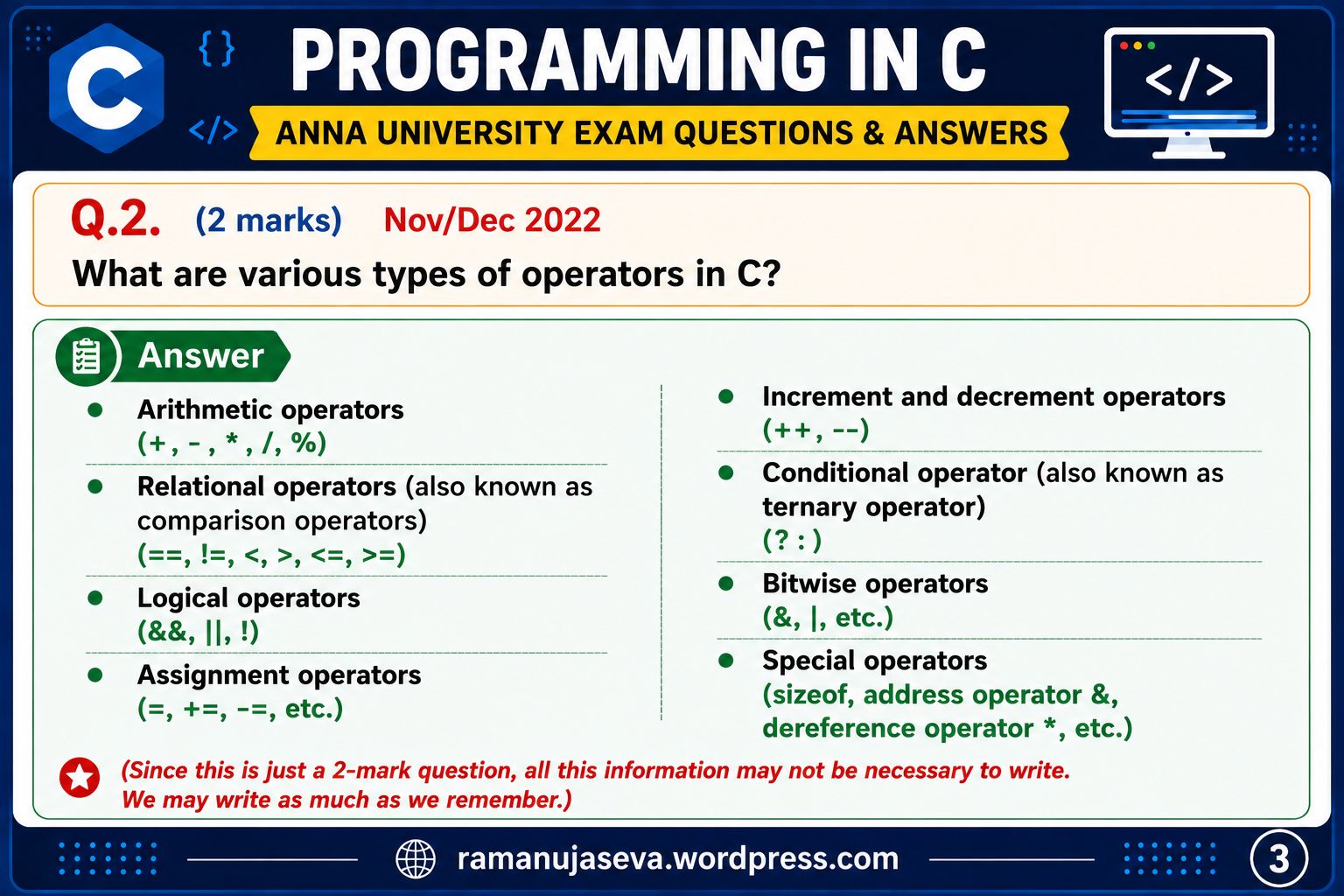
    Q.2. (2 Marks) (Nov/Dec 2022) Unit 1.

    What are various types of operators in C?
    Answer
    • Arithmetic operators (+, -, *, /, %)
    • Relational operators (also known as comparison operators) (==, !=, <, >, <=, >=)
    • Logical operators (&&, ||, !)
    • Assignment operators (=, +=, -=, etc.)
    • Increment and decrement operators (++, --)
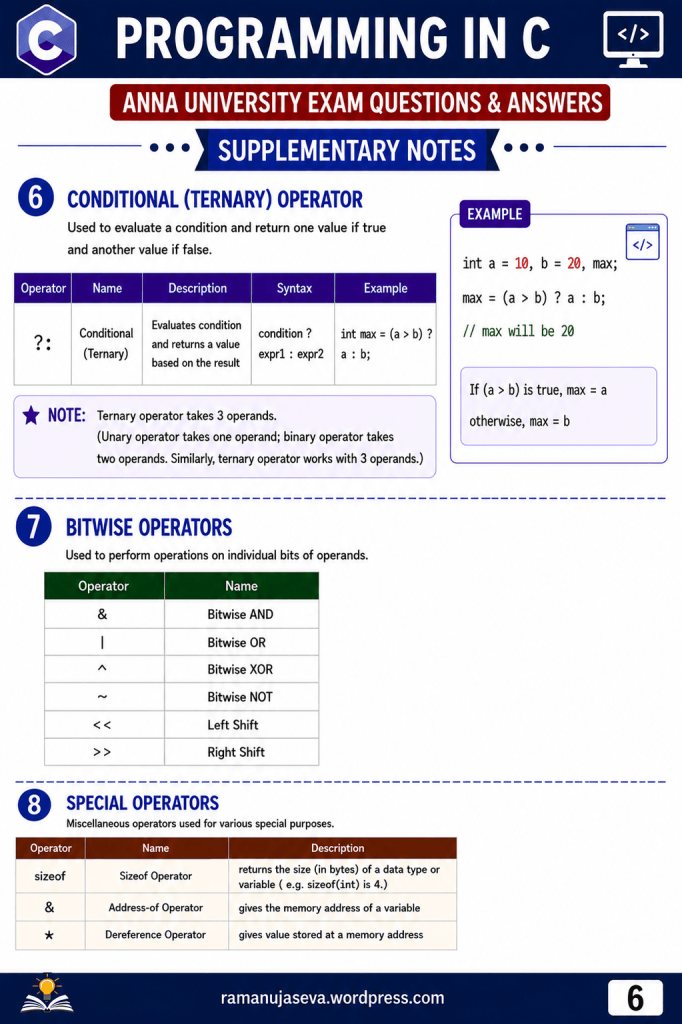
    • Conditional operator (also known as ternary operator) (?:)
    • Bitwise operators (&, |, etc.)
    • Special operators (sizeof, address operator &, dereference operator *, etc.)

    Note: Since this is just a 2-mark question, all this information may not be necessary to write. We may write as much as we remember.


    Supplementary Notes
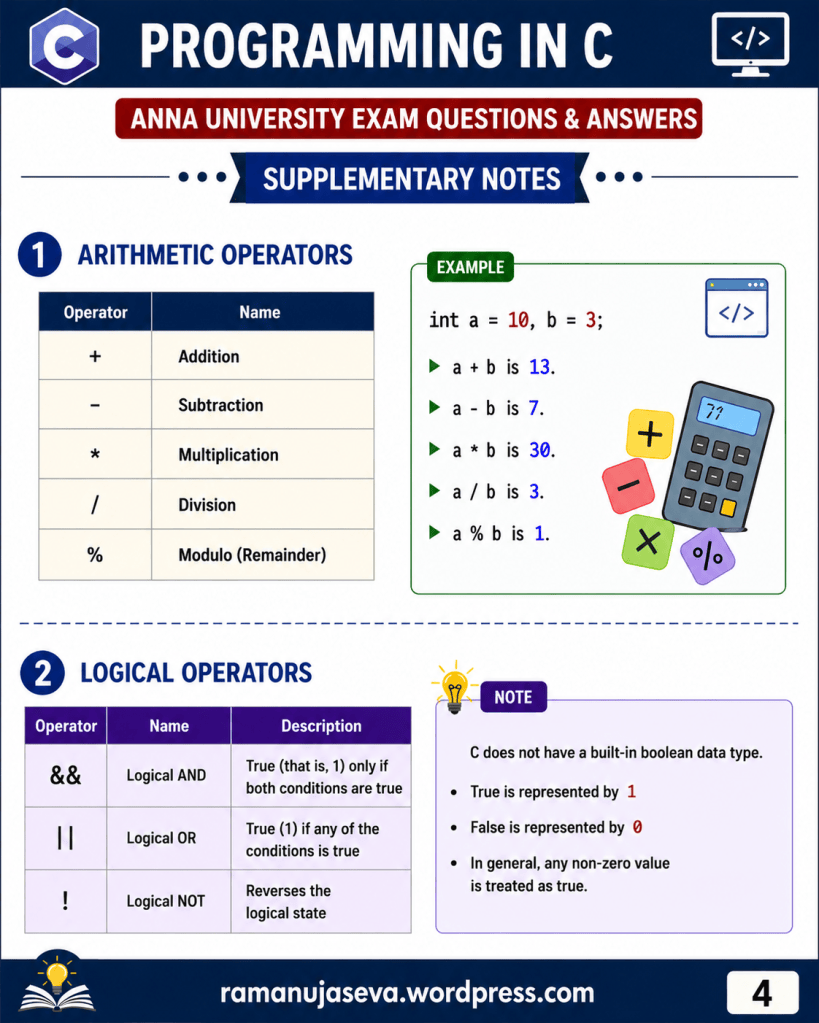
    1. Arithmetic Operators

    Arithmetic operators are used for mathematical calculations.

    OperatorName
    +Addition
    Subtraction
    *Multiplication
    /Division
    %Modulo (Remainder)
    Example
    int a = 10, b = 3;
    a + b is 13
    a - b is 7
    a * b is 30
    a / b is 3
    a % b is 1

    2. Logical Operators
    OperatorNameDescription
    &&Logical ANDTrue (that is, 1) only if both conditions are true
    ||Logical ORTrue (1) if any of the conditions is true
    !Logical NOTReverses the logical state
    Note

    C does not have a built-in boolean data type.

    • True is represented by 1
    • False is represented by 0
    • In general, any non-zero value is treated as true.

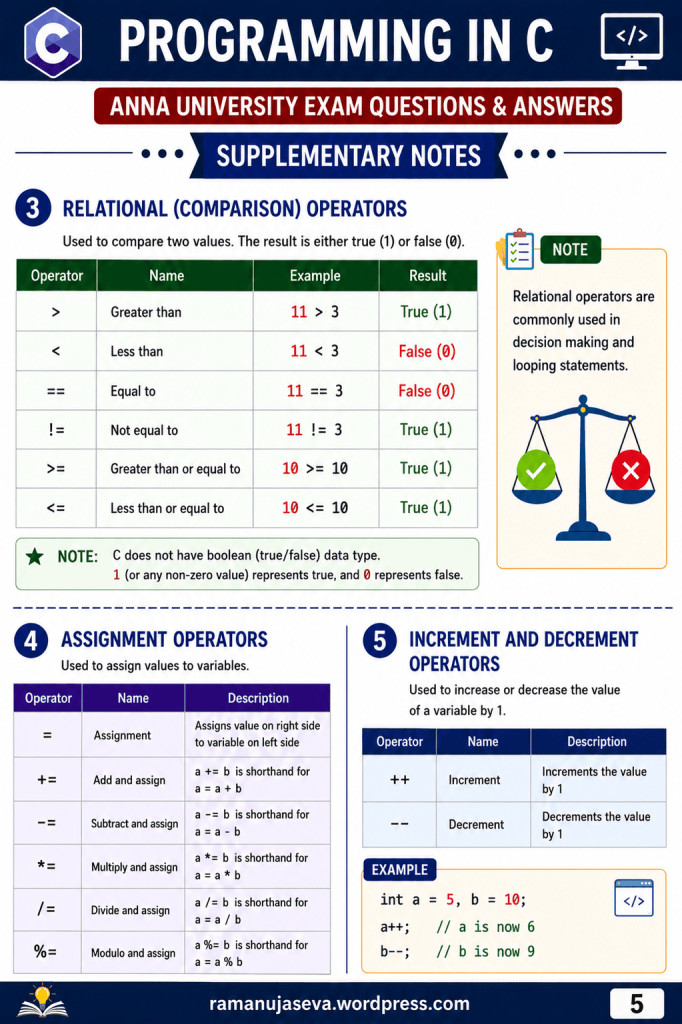
    3. Relational (Comparison) Operators

    Relational operators are used to compare two values. The result is either true (1) or false (0).

    OperatorNameExampleResult
    >Greater than11 > 3True (1)
    <Less than11 < 3False (0)
    ==Equal to11 == 3False (0)
    !=Not equal to11 != 3True (1)
    >=Greater than or equal to10 >= 10True (1)
    <=Less than or equal to10 <= 10True (1)
    Note

    C does not have boolean (true/false) data type.

    • 1 (or any non-zero value) represents true.
    • 0 represents false.

    Relational operators are commonly used in decision-making and looping statements.


    4. Assignment Operators

    Assignment operators are used to assign values to variables.

    OperatorNameDescription
    =AssignmentAssigns value on right side to variable on left side
    +=Add and assigna += b is shorthand for a = a + b
    -=Subtract and assigna -= b is shorthand for a = a - b
    *=Multiply and assigna *= b is shorthand for a = a * b
    /=Divide and assigna /= b is shorthand for a = a / b
    %=Modulo and assigna %= b is shorthand for a = a % b

    5. Increment and Decrement Operators

    Increment and decrement operators are used to increase or decrease the value of a variable by 1.

    OperatorNameDescription
    ++IncrementIncrements the value by 1
    DecrementDecrements the value by 1
    Example
    int a = 5, b = 10;
    a++; // a is now 6
    b--; // b is now 9

    6. Conditional (Ternary) Operator

    The conditional (ternary) operator is used to evaluate a condition and return one value if true and another value if false.

    Syntax
    condition ? expression1 : expression2
    Example
    int a = 10, b = 20, max;max = (a > b) ? a : b;

    Since a > b is false, max will be 20.

    Note

    The ternary operator takes 3 operands.

    • Unary operator takes one operand.
    • Binary operator takes two operands.
    • Similarly, ternary operator works with three operands.

    7. Bitwise Operators

    Bitwise operators perform operations on individual bits.

    OperatorName
    &Bitwise AND
    |Bitwise OR
    ^Bitwise XOR
    ~Bitwise NOT
    <<Left Shift
    >>Right Shift

    8. Special Operators

    Special operators are used for various special purposes.

    OperatorNameDescription
    sizeofSizeof OperatorReturns the size (in bytes) of a data type or variable (e.g. sizeof(int) is 4.)
    &Address-of OperatorGives the memory address of a variable
    *Dereference OperatorGives the value stored at a memory address

  • Past year Anna University questions and answers. Programming in C. Part 1.

    Programming in C – CS 3251
    Anna University Exam Questions & Answers (2021 Regulation)

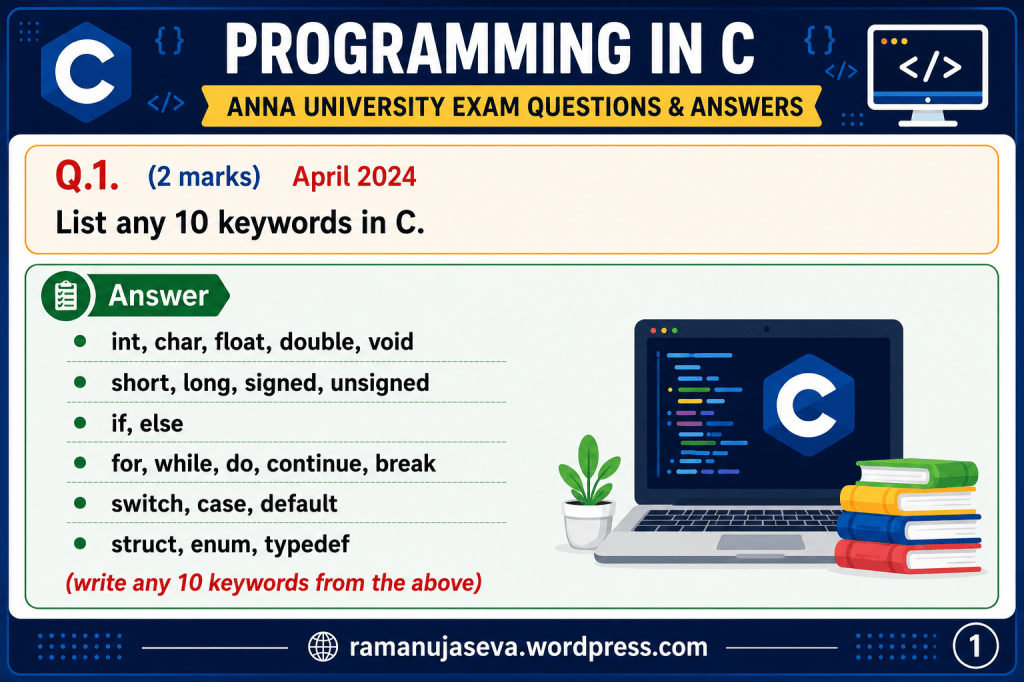
    Q.1. (2 marks, Unit 1) April 2024
    List at least any 10 keywords in C.

    Answer
    • int, char, float, double, void
    • short, long, signed, unsigned
    • if, else
    • for, while, do, continue, break
    • switch, case, default
    • struct, enum, typedef
    (Write any 10-12 keywords from the above.)


    Supplementary Notes

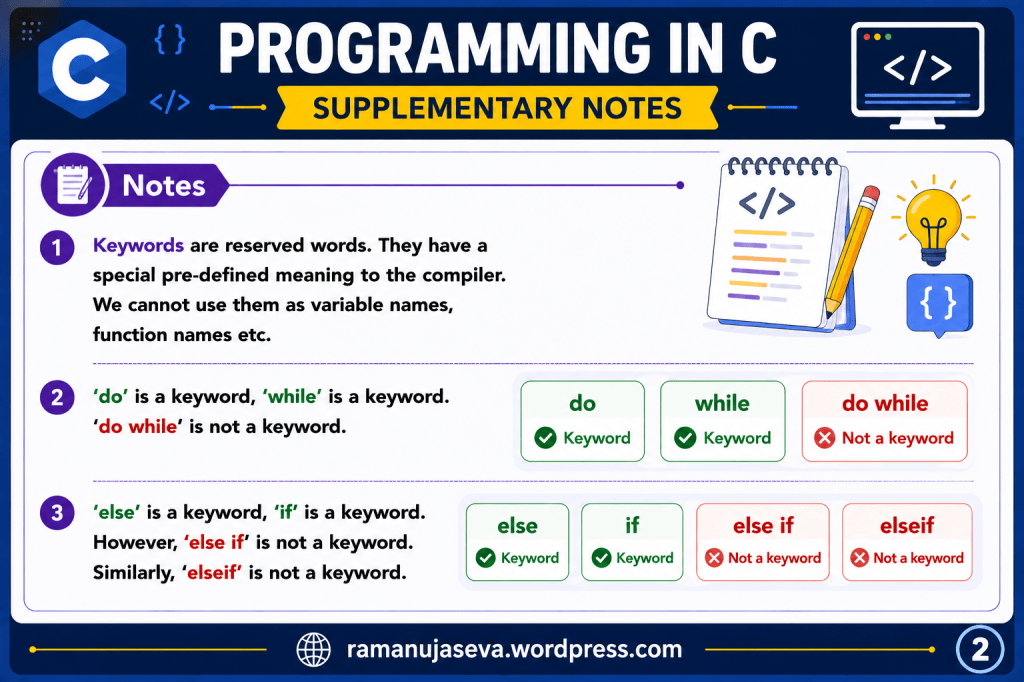
    1. Keywords are reserved words. They have a special pre-defined meaning to the compiler. We cannot use them as variable names, function names, etc.
    2. ‘do’ is a keyword, ‘while’ is a keyword. ‘do while’ is not a keyword.
    3. ‘else’ is a keyword, ‘if’ is a keyword. However, ‘else if’ is not a keyword. Similarly, ‘elseif’ is not a keyword.
  • (See Part 1 of the story here.)


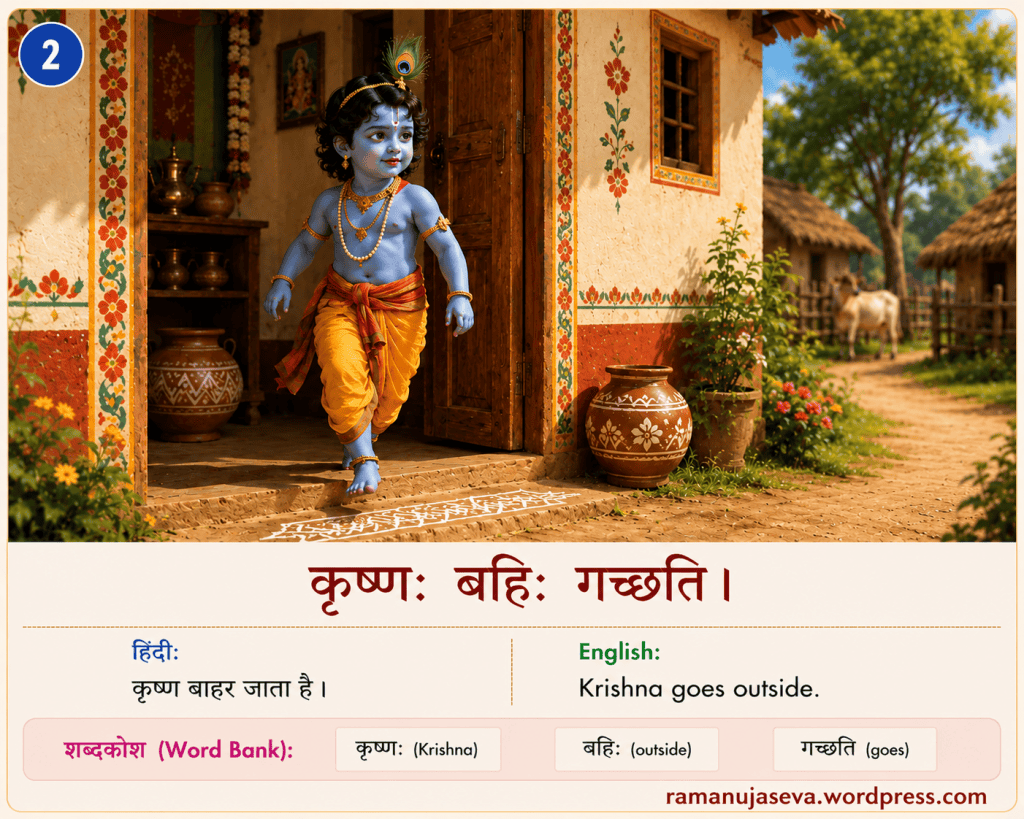
    कृष्णः बहिः गच्छति। = Krishna goes outside.

    Word-by-word meanings
    कृष्णः = Krishna
    गच्छति = goes
    बहिः = outside

    कृष्ण is the subject (the doer) in this sentence. The action (the verb) is that of going (गच्छति).
    The doer should be in प्रथमा विभक्तिः (nominative case). The प्रथमा विभक्तिः , एकवचनम् (nominative, singular) form of कृष्ण is कृष्णः . Hence that word is used in the sentence. (The two vertical dots after कृष्ण is called विसर्ग. )

    कृष्णः is singular number. Therefore, the appropriate singular form of the verb should be used. (Subject-Verb agreement). The singular number, present tense form of the verb for ‘going’ is गच्छति (प्रथमपुरुष, एकवचन). Hence, गच्छति is used in our sentence.

    Other similar examples:
    कृष्णः क्रीडति। = Krishna plays.

    कृष्णः नृत्यति। = Krishna dances.


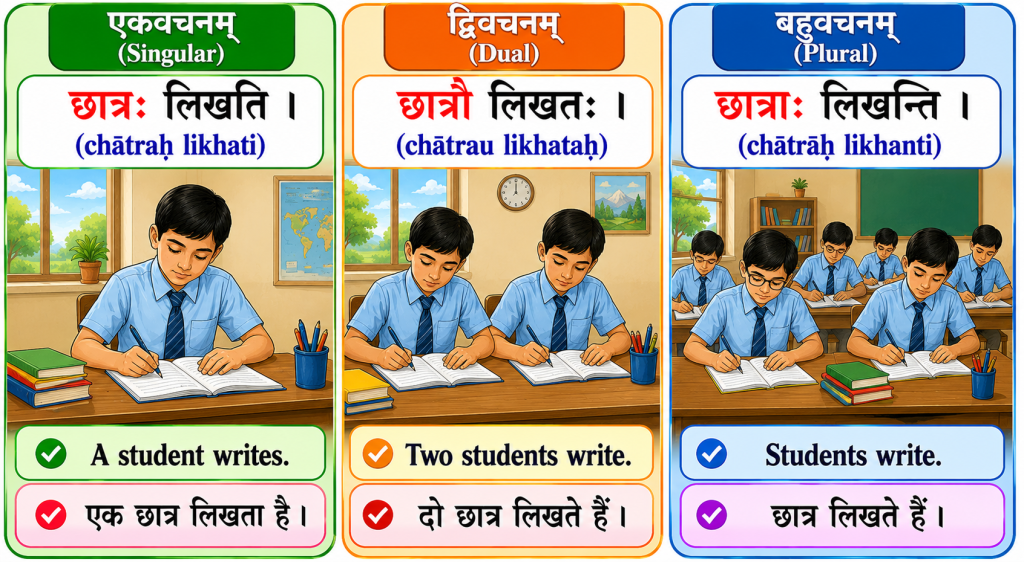
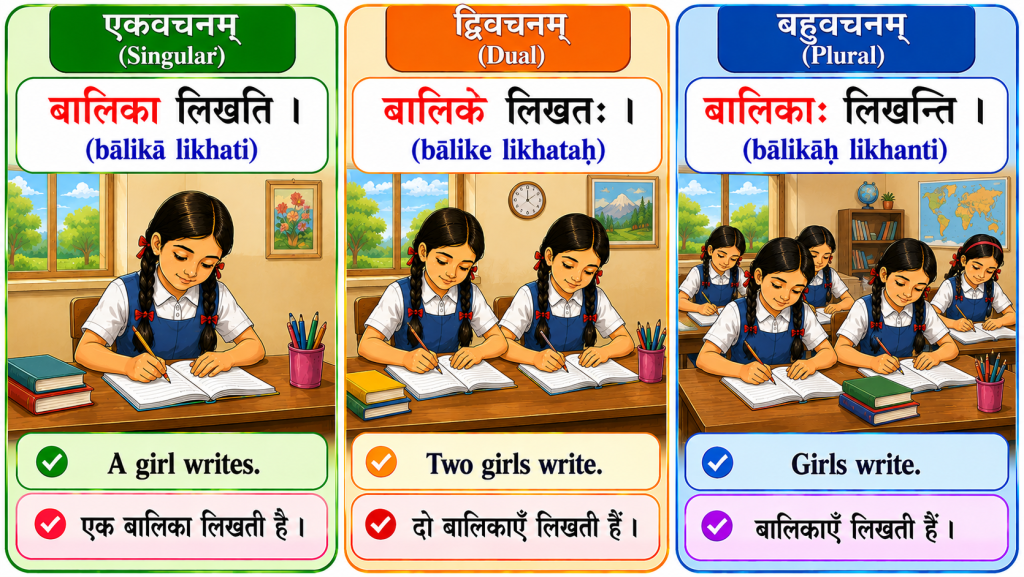
    बालकः लिखति। = A/the boy writes.
    बालिका पठति। = A/The girl studies.


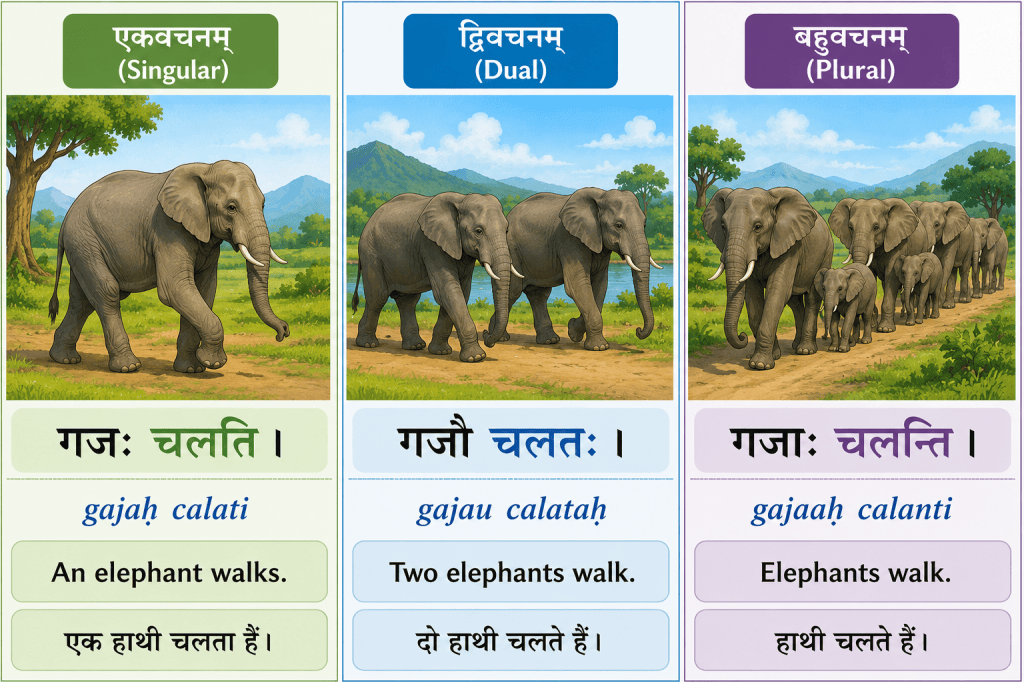
    If the subject (the doer) is dual number, then correspondingly the verb should also be in dual form (Subject-Verb agreement).
    बालकौ लिखतः। = The two boys write. (बालकौ is the प्रथमा विभक्ति, द्विवचन form of बालक.)
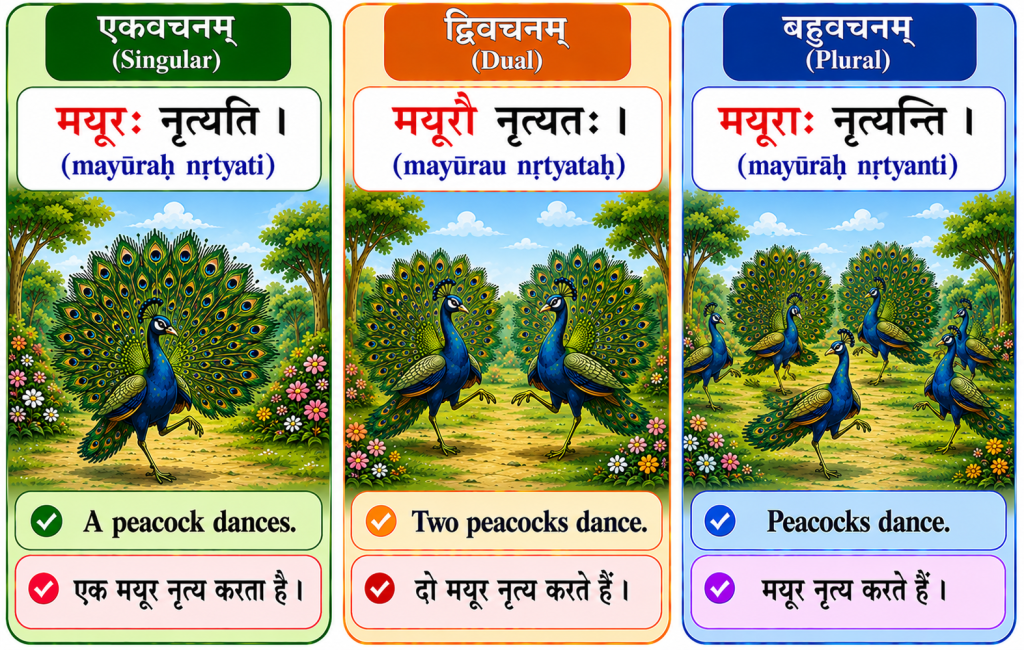
    गजौ चलतः। = The two elephants walk

    Both बालक and गज are अकारान्त पुल्लिङ्ग (masculine gender words, ending in अ sound.)

    विभक्तिःएकवचनम्द्विवचनम्बहुवचनम्
    प्रथमाबालकःबालकौबालकाः
    विभक्तिःएकवचनम्द्विवचनम्बहुवचनम्
    प्रथमागजःगजौगजाः

    बालिके क्रीडतः। = the two girls play. (बालिके is the प्रथमा विभक्ति, द्विवचन of बालिका.)
    बालिके पठतः। = the two girls study.
    बालिके गायतः। = the two girls sing.

    बालिका.is आकारान्त स्त्रीलिङ्ग (feminine gender word, ending in sound.)

    विभक्तिःएकवचनम् (singular)द्विवचनम् (dual)बहुवचनम् (more than two)
    प्रथमा (doer/subject) बालिकाबालिकेबालिकाः

    Similarly, if the doer is in plural number (बहुवचन) (more than 2), then correspondingly the बहुवचन form of the verb should be used.
    बालकाः पिबन्ति। = The boys drink. (बालकाः is the प्रथमा विभक्ति, बहुवचन form of बालक)
    बालकाः पश्यन्ति। = The boys see.
    बालकाः क्रीडन्ति। = the boys play.

    बालिकाः गच्छन्ति। = the girls go. (बालिकाः is the प्रथमा विभक्ति, बहुवचन form of बालिका)
    बालिकाः आगच्छन्ति। = the girls come.
    बालिकाः पठन्ति। = the girls study/read.


    Verb forms of गम् dhaatu, meaning ‘to go’
    3rd person, Present tense

    पुरुषःएकवचनम् (singular)द्विवचनम् (dual)बहुवचनम् (more than 2)
    प्रथमपुरुषः (3rd person) गच्छतिगच्छतःगच्छन्ति

    क्रीड् dhaatu (‘to play’)

    पुरुषःएकवचनम्द्विवचनम्बहुवचनम्
    प्रथमपुरुषःक्रीडतिक्रीडतःक्रीडन्ति

    पठ् dhatu (‘to read / to study’)

    पुरुषःएकवचनम्द्विवचनम्बहुवचनम्
    प्रथमपुरुषःपठतिपठतःपठन्ति

    End of lesson. Hope you found it useful.

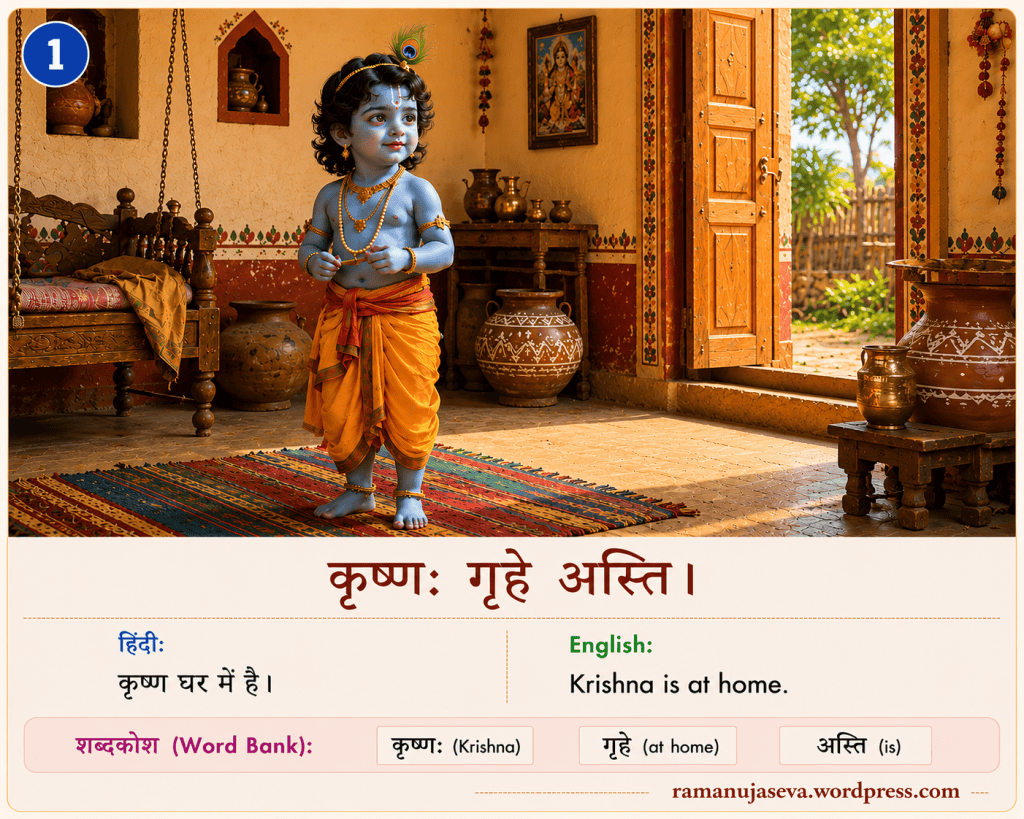
  • कृष्णः गृहे अस्ति। (kṛṣṇaḥ gṛhe asti)
    Krishna is at home.

    Word by word meaning and grammar notes-
    कृष्णः – Krishna
    कृष्ण – अकारान्त पुल्लिङ्गम् (masculine), प्रथमा विभक्तिः (nominative), एकवचनम् (singular)

    गृहे – at home, in the home
    गृह – अकारान्त नपुंसकलिङ्गम् (neuter), सप्तमी विभक्तिः (Locative case), एकवचनम् (Singular)

    अस्ति = is
    अस् धातुः , लट् लकारः (present tense), प्रथमपुरुषः (third person), एकवचनम् (singular)


    प्रथमा विभक्तिः (nominative case)

    Examples similar to above:
    बालकः अस्ति। = There is a boy.
    बालकः क्रीडति। = The boy plays.
    बालकः खादति। = The boy eats.

    The boy is the doer (the subject) in these sentences. In Sanskrit, the doer is written in प्रथमा विभक्तिः (nominative case).

    विभक्तिःएकवचनम्द्विवचनम्बहुवचनम्
    प्रथमाबालकःबालकौबालकाः

    बालकौ क्रीडतः। = Two boys play.
    बालकाः खादन्ति। = The boys play.


    सप्तमी विभक्तिः (locative case)

    Locative case is used to convey where something is, or where something is being done.
    Examples:
    शिक्षकः विद्यालये अस्ति। = The teacher is in the school.
    छात्रः भोजनालये अस्ति। = The student is in the dining hall.
    बालकाः क्रीडाङ्गणे क्रीडन्ति। = Boys play in the playground.
    गजाः वने वसन्ति। = Elephants live in the forest.
    In the above, the highlighted words indicate location, and are in saptami vibhakti.

    गृह — अकारान्त-नपुंसकलिङ्गम्

    विभक्तिःएकवचनम्द्विवचनम्बहुवचनम्
    सप्तमीगृहेगृहयोःगृहेषु

    वन — अकारान्तनपुंसकलिङ्गम्।

    विभक्तिःएकवचनम्द्विवचनम्बहुवचनम्
    सप्तमीवनेवनयोःवनेषु

    विद्यालय — अकारान्त-पुल्लिङ्गम्।

    विभक्तिःएकवचनम्द्विवचनम्बहुवचनम्
    सप्तमीविद्यालयेविद्यालययोःविद्यालयेषु

    अस् धातुरूपम् , लट् लकारः (present tense)

    अस् dhaatu means “to be” (“is”, “are”, “am”, etc)

    (singular)
    बालकः अस्ति। = There is a boy.
    बालकः देवालये अस्ति। = The boy is in the temple.
    बालिका अस्ति। = There is a girl.

    (dual)
    बालकौ स्तः। = There are two boys.
    बालकौ गृहे स्तः। = (The) two boys are in the house.

    (plural)
    शिष्याः सन्ति। = There are (several) disciples.
    बालकाः सन्ति। = There are (several) boys.
    शिष्याः आश्रमे सन्ति। = (The) disciples are in the hermitage.
    बालिकाः विद्यालये सन्ति। = Girls are in the school.

    अस् धातुरूपम् , लट् लकारः (verb forms, present tense)

    पुरुषःएकवचनम्द्विवचनम्बहुवचनम्
    प्रथमपुरुषःअस्तिस्तःसन्ति

    This completes this lesson. Hope you found it useful. More parts later.

  • Wise sayings in Sanskrit – 2. Effort leads to accomplishment.

    उद्यमेन हि सिद्ध्यन्ति कार्याणि न मनोरथैः ।
    न हि सुप्तस्य सिंहस्य प्रविशन्ति मुखे मृगाः ॥

    udyamena hi siddhyanti kāryāṇi na manorathaiḥ ।
    na hi suptasya siṃhasya praviśanti mukhe mṛgāḥ ॥

    Tasks are accomplished through effort, not merely by wishes. Deer do not enter the mouth of a sleeping lion.


    Word-by-Word Meaning (with grammar notes)
    First Line

    कार्याणि — tasks, works (कार्य , नपुंसकलिङ्गम् — प्रथमा-विभक्तिः — बहुवचनम् ) (neuter, nominative, plural) सिद्ध्यन्ति — are accomplished (प्रथम-पुरुषः, बहुवचनम्) (third person, plural)
    उद्यमेन — by effort (उद्यम , पुल्लिङ्गम् , तृतीया-विभक्तिः, एकवचनम्) (masculine, instrumental, singular)
    हि — indeed (अव्ययम्) (indeclinable)

    — not (अव्ययम्) (indeclinable)
    मनोरथैः — by wishes, daydreams (मनोरथ — पुल्लिङ्गम् — तृतीया-विभक्तिः — बहुवचनम् ) (masculine, instrumental, plural)


    Second Line

    मृगाः — deer (मृग — पुल्लिङ्गम् — प्रथमा-विभक्तिः — बहुवचनम्) (masculine, nominative, plural)
    हि — indeed (अव्ययम्) (indeclinable)
    — not (अव्ययम्) (indeclinable)
    प्रविशन्ति — enter (प्र + विश् — लट्-लकारः — प्रथम-पुरुषः — बहुवचनम् ) (present tense, third person, plural)
    मुखे — into the mouth (मुख — नपुंसकलिङ्गम् — सप्तमी-विभक्तिः — एकवचनम् ) (neuter, locative, singular)
    सुप्तस्य — of a sleeping (सुप्त — पुल्लिङ्गम् — षष्ठी-विभक्तिः — एकवचनम् ) (masculine, genitive, singular)
    सिंहस्य — of a lion (सिंह — पुल्लिङ्गम् — षष्ठी-विभक्तिः — एकवचनम्) (masculine, genitive, singular)


    Simple Grammar Notes
    1. Instrumental Case (तृतीया-विभक्तिः)

    Notice these words:

    • उद्यमेन = by effort
    • मनोरथैः = by wishes

    These words answer the question “By what?”

    Examples:

    • उद्यमेन = by effort
    • पुस्तकेन = by means of a book
    • हस्तेन = by hand
    • उद्यमेन कार्याणि सिद्ध्यन्ति। = Tasks are accomplished through effort.
    • मनोरथैः कार्याणि न सिद्ध्यन्ति। = Tasks are not accomplished by wishes.

    We can see the shabd roop (case declensions) for instrumental case:
    बालक (पुल्लिङ्गम्) — तृतीया-विभक्तिः:
    बालकेन (एकवचनम्) | बालकाभ्याम् (द्विवचनम्) | बालकैः (बहुवचनम्)

    उद्यमः (पुल्लिङ्गम्) — तृतीया-विभक्तिः:
    उद्यमेन (एकवचनम्) | उद्यमाभ्याम् (द्विवचनम्) | उद्यमैः (बहुवचनम्)

    मनोरथः (पुल्लिङ्गम्) — तृतीया-विभक्तिः:
    मनोरथेन (एकवचनम्) | मनोरथाभ्याम् (द्विवचनम्) | मनोरथैः (बहुवचनम्)


    2. Genitive Case (षष्ठी-विभक्तिः)

    Notice:

    • सुप्तस्य = of a sleeping
    • सिंहस्य = of a lion

    Together:

    सुप्तस्य सिंहस्य = of a sleeping lion


    3. Adjective-Noun agreement


    सुप्तस्य सिंहस्य = of a sleeping lion (षष्ठी-विभक्तिः — एकवचनम्) (genitive, singular)
    सुप्तेन सिंहेन = by a sleeping lion (तृतीया-विभक्तिः — एकवचनम्) (instrumental, singular)
    सुप्तः सिंहः = a sleeping lion (प्रथमा-विभक्तिः , एकवचनम् ) (nominative, singular)


    4. Verb

    सिद्ध्यन्ति = are accomplished
    प्रविशन्ति = enter
    The ending -न्ति often indicates that the subject is plural.

    Examples:

    • मृगाः प्रविशन्ति। — The deer enter.
    • छात्राः पठन्ति। — The students study.

    Vocabulary Practice
    • उद्यमः — effort
    • कार्यम् — task, work
    • मनोरथः — wish, desire
    • सिंहः — lion
    • मृगः — deer
    • मुखम् — mouth

    What Does the Verse Teach?

    The verse teaches that success comes through effort. Merely wishing for success is not enough. Even a powerful lion must get up and act; food does not come to it automatically.

    उद्यमः आवश्यकः।
    Effort is necessary.

    उद्यमेन सफलता भवति।
    Success comes through effort.

    शुभमस्तु!

  • Simple Conversation in Sanskrit. Greeting a friend. Exchanging greetings.

    In this lesson, we learn a very simple Sanskrit conversation between two friends. The conversation teaches us how to greet someone and ask about their well-being.

    The word “नमस्ते” (Namaste) is one of the most commonly used greetings in Sanskrit. It literally means “Salutations to you.” The word “मित्र” (Mitra) means “friend.” In the conversation, मित्र is used in the vocative case (संबोधन) because the speaker is directly addressing the friend. Thus, “नमस्ते मित्र” means “Hello, friend!” or literally “Salutations to you, O friend!”

    We also learn the question “कथम् असि?”, which means “How are you?” A common reply is “अहम् कुशली अस्मि”, meaning “I am well.”

    Conversation

    नमस्ते मित्र।
    Hello, friend.

    नमस्ते।
    Hello.

    कथम् असि?
    How are you?

    अहम् कुशली अस्मि। त्वम् कथम् असि?
    I am well. How are you?

    अहम् अपि कुशली अस्मि।
    I am also well.

    New Words

    • नमस्ते — Hello; Salutations to you
    • मित्र — O friend!
    • कथम् — How
    • अहम् — I
    • त्वम् — You
    • कुशली — Well, healthy (masculine gender)
    • अपि — Also
    • अस्मि — I am
    • असि — You are

    Grammar Note

    Notice these important verb forms:

    • अस्मि — I am
    • असि — You are
    • अस्ति — He/She/It is

    Also note:

    • मित्रम् = friend (basic form)
    • मित्र = O friend! (vocative form, used when addressing someone directly)

    These forms occur very frequently in Sanskrit and are worth memorizing early.

    Additional Grammar Note

    You may notice that both “कथम् असि?” and “त्वम् कथम् असि?” mean “How are you?”

    In Sanskrit, the subject pronoun is often omitted because the verb already tells us who is being spoken about.

    • कथम् असि? — How are you?
    • त्वम् कथम् असि? — How are you?

    Both sentences are correct and have the same meaning. The word त्वम् (“you”) is added only for emphasis or clarity.

    Practice

    Read the conversation aloud several times. Try speaking both parts yourself. Once you are comfortable with the dialogue, practise it with a friend or family member. Learning Sanskrit becomes much easier when you use it in simple everyday conversations.
    Hope you find this useful. We shall look at further lessons later.

    शुभमस्तु! (May all be well!)

  • Simple Sanskrit conversation. Learn Sanskrit easily. Introducing oneself.

    A Simple Sanskrit Conversation

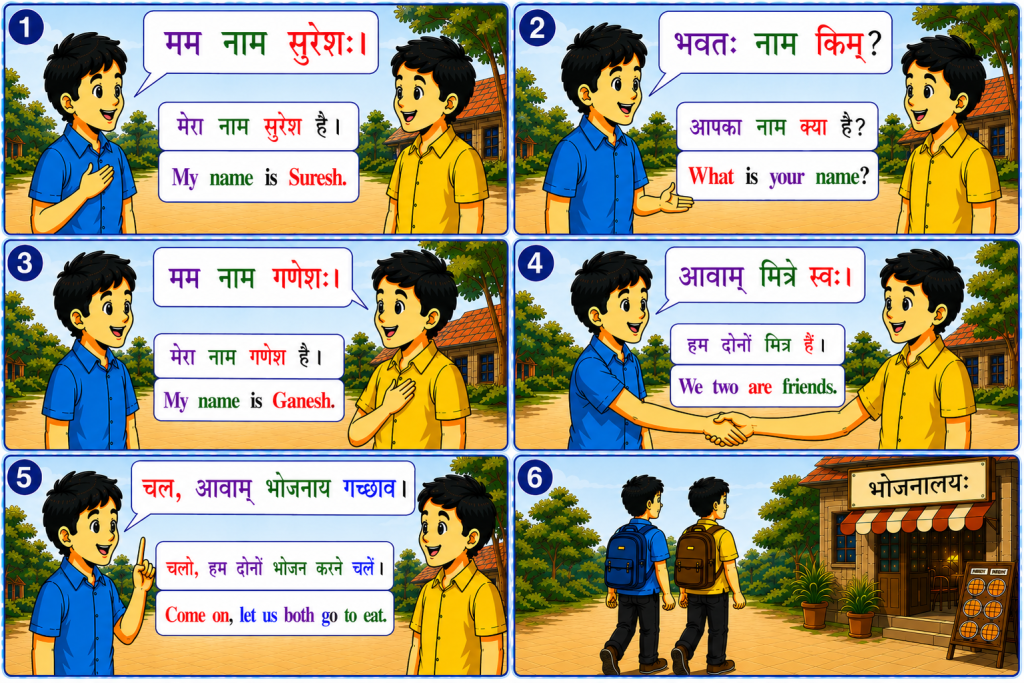
    In this lesson, we learn a simple Sanskrit conversation between two boys, Suresh and Ganesh.

    First, Suresh introduces himself:

    मम नाम सुरेशः।
    (मेरा नाम सुरेश है।)
    (My name is Suresh.)

    He then asks Ganesh:

    भवतः नाम किम्?
    (आपका नाम क्या है?)
    (What is your name?)

    Ganesh replies:

    मम नाम गणेशः।
    (मेरा नाम गणेश है।)
    (My name is Ganesh.)

    The two boys become friends and say:

    आवाम् मित्रे स्वः।
    (हम दोनों मित्र हैं।)
    (We two are friends.)

    Finally, Suresh says:

    चल, आवाम् भोजनाय गच्छाव।
    (चलो, हम दोनों भोजन करने चलें।)
    (Come on, let us both go to eat.)

    The two friends then walk towards the restaurant together.

    Grammar Notes

    Dual Number (द्विवचनम्)

    Sanskrit has three numbers:

    • एकवचनम् (Singular) – one
    • द्विवचनम् (Dual) – two
    • बहुवचनम् (Plural) – many (more than two)

    In this conversation, we frequently use dual forms because there are exactly two boys.

    Examples:

    • आवाम् = we two
    • मित्रे = two friends
    • स्वः = we two are
    • गच्छाव = let us two go

    Hope you found it useful. We shall look at further lessons later.

Is this your new site? Log in to activate admin features and dismiss this message
Log In